Skip to Main Content (Press Enter)

Skip to navigation

Skip to search

Skip to footer

How to access Lexus Link+

  • DOWNLOAD AND REGISTER LEXUS LINK+​

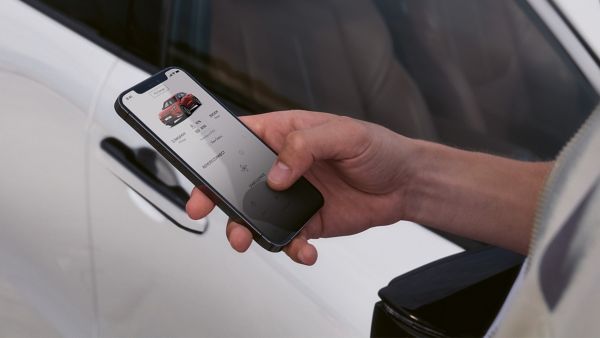
    Download Lexus Link+. Open the app and create an account or log in using your Lexus credentials. Go to My Garage and select Add a Vehicle. To complete the process, go to the Connected Services Centre and accept the Terms of Use and Privacy Statement.

  • HELP IS ALWAYS AT HAND

    Our Lexus support hub features useful FAQs, step-by-step guides, how-to videos and direct links to customer support. Here, you’ll find everything you need to know about Lexus Link+.

FAQs

  1. All

With the Lexus Link+ app, you can remotely control your vehicle, monitor its health, plan journeys, manage charging, and stay connected to key updates—all from your smartphone.​
Here’s a detailed breakdown of what you can do with the Lexus Link+ app:​


Remote Vehicle Control​

  • Start/Stop Engine: Power your car on or off remotely.​
  • Lock/Unlock Doors: Secure or access your vehicle from anywhere.​
  • Climate Control: Precondition your cabin temperature before you enter.
  • Hazard Lights Activation: Flash your hazard lights to help locate your car in crowded areas.​


Location & Navigation​

  • Find My Car: Locate your parked vehicle easily.​
  • Journey Planning: Plan routes and send them directly to your car’s navigation system.​
  • Points of Interest: Search and save destinations for future trips.​


Vehicle Health & Maintenance​

  • Service Reminders: Get alerts when your car is due for maintenance.
  • Vehicle Status: Check fuel level, mileage, battery charge, and tire pressure.​
  • Driving Analytics: Review trip history and driving style insights.​


EV & Charging Features (for electrified models)​

  • Home Charging Management: Monitor and schedule charging sessions at home.​
  • Smart Charging: Optimize charging times based on energy tariffs or driving needs.​
  • Public Charging Access: Locate nearby charging stations and check availability.​
  • Battery Monitoring: View current charge level and estimated range.​


Digital Key (on select models)​

  • Use your smartphone to unlock, start, and drive your vehicle—no physical key required.​

Notifications & Personalization​

  • Real-Time Alerts: Receive updates on vehicle status, service needs, and charging progress.​
  • Custom Dashboard: Personalize your home screen with the info you care about most.​


The Lexus Link+ app is designed to make ownership easier, smarter, and more connected—whether you're driving a hybrid, plug-in hybrid, or fully electric Lexus. You can explore more on our official website.

You can access Connected Services at any time through the Lexus Link+ app, but there are a few important conditions that affect how and when services and data appears:​

When Connected Services work best:​

  • Data Availability: Car data is sent to the app when the engine is turned off. You’ll be able to view your last trip details shortly after switching off the engine​
  • Mobile Data Required: A stable mobile network is needed to transmit data. If you park underground or in areas with poor coverage, data may not sync immediately​
  • Common reasons services might not work as expected or data might be missing​
  • Connected Services not activated​
  • Ensure Standard Services are enabled in the Connected Services Centre​
  • Multimedia system profile not linked​
  • Privacy Mode enabled. If location sharing is disabled, trip data won’t be saved. Check and enable location sharing in the Privacy Mode section under MyGarage. For more help, refer to the Privacy Mode FAQs in the app

Different scenario may cause your Remote services not to work. Let's try to list the most frequent ones:​

  • Your vehicle may not support some or all the remote services. Please contact your retailer to find out.​
  • You may not have subscribed to the remote services.​
  • If you have not used your car for more than 9 days then your car might have gone into sleep mode to protect its battery life.​


Please go to your car and start the engine.​

  • Please verify that all preconditions are met: all doors closed, hood closed, smart key not inside the vehicle​
  • You have a Plugin hybrid vehicle or Battery Electric Vehicle and Remote Climate won't start? Your EV battery might be below 30% or 20% (depending on the model) in that case please charge your battery.​
  • You have a plugin hybrid vehicle and remote climate won't start? If the outside temperature is below -10°C remote climate won’t operate.

Your Performance Score shows how efficiently and smoothly you drive, based on data collected from your vehicle during each trip.​
It’s calculated as a weighted average of your trip scores, considering the total distance driven per trip. The overall score focuses on two main aspects: acceleration and braking.​

  • Gentle acceleration helps reduce consumption and vehicle wear​
  • Gentle braking helps you stay safe by keeping distance and anticipating obstacles​


The service also provides a detailed score breakdown of your driving behaviour for each trip and monthly period. This includes metrics like acceleration, braking, and constant speed, when available, showing you how consistently you maintained your speed. If most of your driving happens in city conditions, your average speed may be too low for a constant speed score to appear.​

The Performance Score and its details aim to help you understand your driving habits and suggest small changes that could improve efficiency and boost your vehicle's overall performance over time

A trip may be missing from Driving Analytics, Hybrid or EV Coaching for several reasons:​


  • Connected Services not activated: Make sure the Standard Services are activated in the Connected Services Centre - My Garage in the App.​
  • Profile not linked: Link your profile to the Multimedia system ( the head unit) in your vehicle so trip data is recorded in your App.​
  • Privacy Mode enabled: At the end of the trip, if your vehicle location sharing is disabled, then your trip data will not be saved. If you want to see trip data, please ensure that the location sharing is enabled. You can refer to Privacy Mode section (MyGarage) in the app to check the status of location data sharing. To find out more, refer to questions about Privacy mode under category "Account".​
  • No Trips Yet: Driving Analytics becomes available after your first recorded trip.​
  • Short Trips: Very short journeys (approximately less than 50 meters and 10 seconds) may not be saved to avoid clutter in the App.​
  • GPS signal Issues: Trips may not record correctly if you park in areas with limited or absence of coverage of GPS signals (for example, underground parking). They may appear later once the signal improves.​
  • Data Sync Delay: Trip data may take a few hours to appear.​
  • System Maintenance: Temporary outages or updates may affect trip recording.​


If trips are still missing, please go to the Contact Us or App Support sections of the app.